
The short answer
A small shared album can make distance feel shorter without giving relatives access to a parent's entire photo library or account. Choose a few pictures, invite people deliberately, and check whether a link opens the album to anyone who receives it. A shared album is a way to stay connected, not the only backup for important originals.
In this guide 8 sections
What to keep in mind
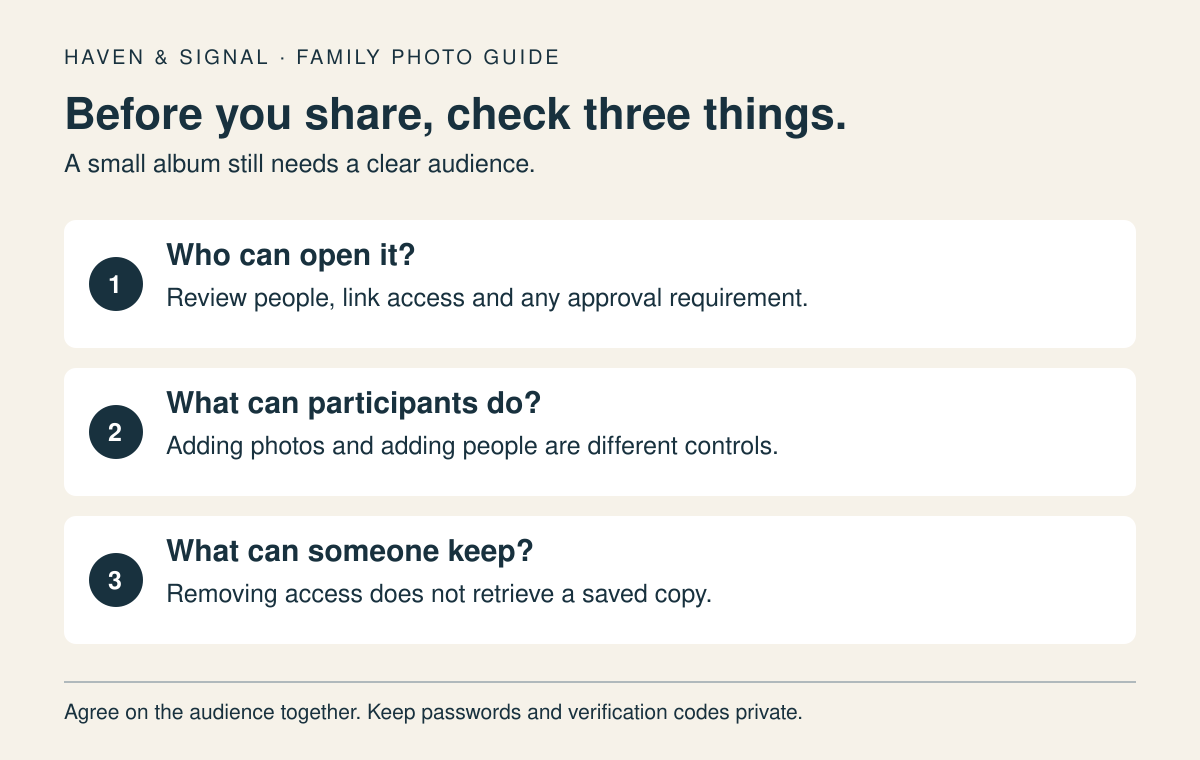
- 1Use separate Apple or Google Accounts; nobody needs the parent's sign-in or verification code to view a shared album.
- 2Review who can add people, not just who can add photos. Recheck the participant list after invitations.
- 3Check whether participants can add photos or comments before inviting a group.
- 4Saving or removing a shared item is different from preserving the original photo in the owner's library.
01
Choose a small album and agree on its audience#
Ask your parent which pictures they would enjoy receiving and whether they want to contribute. Start with a handful from one family event or week, rather than an automatic feed of every photo. Decide whether children, friends or people outside the immediate family may see it; ask before adding someone else's private image.
Give each person their own account. Do not sign your parent into a relative's Apple or Google Account, exchange passwords, or forward a verification code. An album invitation should grant access to those selected photos, not to the entire library, messages or device.
03
Review Apple link and contribution settings#
In iOS 27, the album owner can use Manage Shared Album to review participants and whether someone may add photos. In iOS 26, the album's More menu leads to its details and participant controls. Avoid turning on Public Website merely to make an invitation easier: Apple says that iOS 26 setting publishes the album to a website anyone can view.
For relatives without an Apple device, iOS 27 supports joining on the web, but the owner still needs to choose the appropriate invitation or approval setting. An invitation may require the recipient to update software or use iCloud.com. Test access with one invited relative before telling a wider family group it is ready.
04
For Android or mixed devices, use Google Photos#
Google Photos supports shared albums on Android, iPhone and the web. On photos.google.com, select a few photos, choose Add to or create new, then Shared album and New shared album. Give it a plain title and use Share to send it to the specific Google Accounts you intend to include. The mobile interface may have different labels.
Google link sharing lets anyone who receives the link view the album. Sharing with named Google Accounts is narrower, but it is not a locked guest list: people with album access can add others. Keep new-member notifications on and review additions. Turning off Collaborate stops photo contributions; it does not establish owner-only invitations.
05
Check what a recipient can actually do#
Ask one invited person to open the album on their own device. Check the right account, the intended pictures and the participant list together. Then check photo contributions and comments separately. Do not add sensitive pictures until the parent can find the album again and the family has agreed who should be included.
Do not use a shared album as a hidden test of the parent's activity. An album can be a pleasant, optional part of communication. If your parent prefers a printed picture, ordinary message or digital frame, use the format they will enjoy.
06
Know what revoking access can and cannot undo#
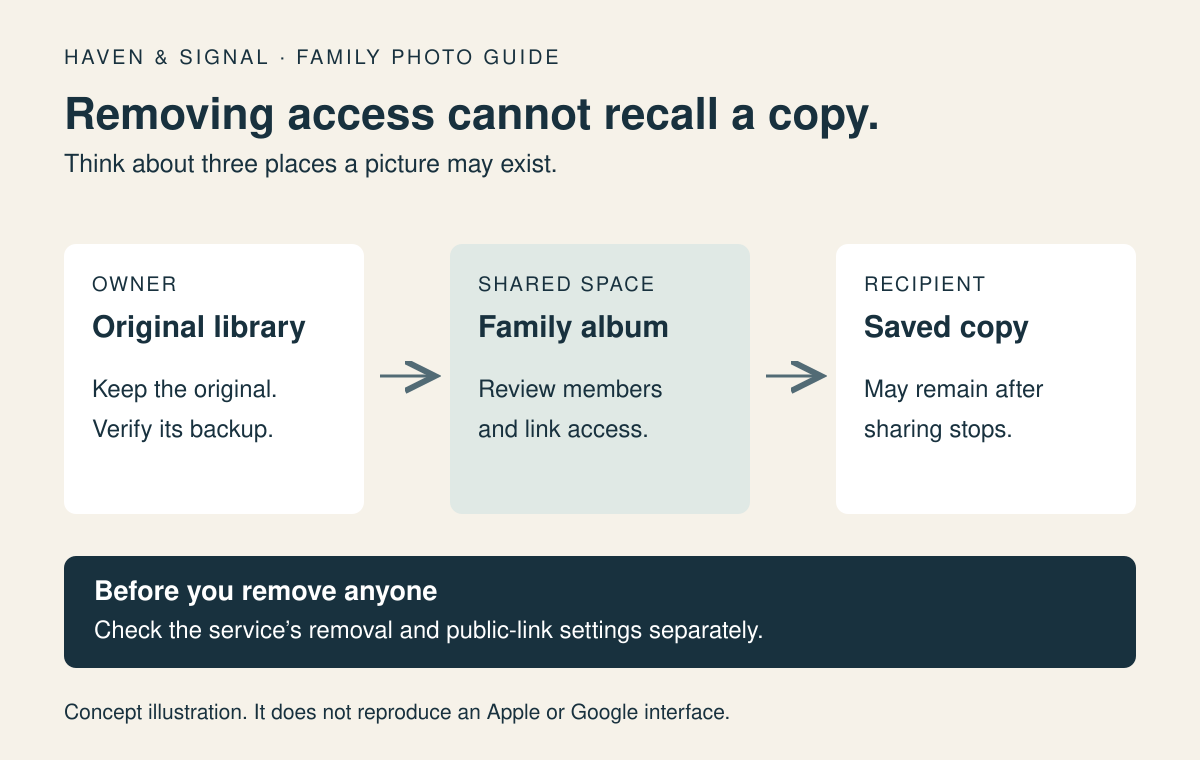
The album owner should review members when a phone is lost or a sharing relationship changes. In Google Photos, removing a person alone is insufficient when link sharing remains on: someone with the old link may still enter. Turn off link sharing as well. Apple lets the owner remove a participant; an iOS 26 Public Website option should also be turned off if it was enabled.
Neither service can remove a photo someone already downloaded or copied. Google explicitly warns about this limit. Apple notes that people can save shared photos to their own libraries. Share only pictures the family is comfortable with recipients retaining.
07
Keep important originals separately#
A shared album should not be the only family archive. Apple limits its warning about copied uploads and possibly different downloaded information to iOS 26, iPadOS 26 and visionOS 26 or earlier. Version 27 adds full-resolution sharing. Keep important originals and a verified backup regardless of version.
In Google Photos, saving a shared picture creates a copy in the recipient’s library. Later changes to the shared original do not update that saved copy. Before changing phones or accounts, check that the original opens from its owner’s library and that the intended backup or independent copy is available.
Keep the original in its owner's library and verify the backup or independent copy before changing phones or accounts. If a picture goes missing, use the separate missing-photo checklist; changing album members will not recover a deleted original.
08
Make sharing an easy family habit#
Pick a simple rhythm, such as adding two or three photos after a weekly call. Use short captions that explain who and what is pictured. Let your parent opt out of notifications or leave the album if it becomes noisy. Recheck the audience when grandchildren, helpers or relationships change.
The useful result is not a large library. It is a parent who can open a small set of welcome pictures, a family that knows who can see them, and originals that remain safe in their proper accounts.
If a photo seems lost
Search the right app before changing accounts
Use the missing-photo checklist to check the library, account, hidden views and trash in a safe order.
Find a missing photoSources and further reading
We favor primary public-health guidance and official product documentation. Section links identify context for documented facts, not validation of our own family-planning steps, schedules or examples. Sources do not imply endorsement of Haven & Signal.
Apple: Use Shared AlbumsiOS 27 and iOS 26 setup, participants, web exposure, saving and copies. Checked October 16, 2026.↗Google Photos: Share photos and videosCreate a shared album, direct versus link sharing, contributions and saved copies. Checked October 16, 2026.↗Google Photos: Stop sharing an albumRemoving members, disabling link sharing and limits of revocation. Checked October 16, 2026.↗Google Photos: Shared album privacy controlsNamed people, anyone-with-link scope and Collaborate setting. Checked October 16, 2026.↗About this guide
Sources, scope and updates.
- Research
- Haven & Signal Research Desk
- Sources checked
- October 16, 2026
- First published
- September 24, 2026
- Materially updated
- October 16, 2026
This guide draws on the linked sources and practical editorial guidance. It does not report hands-on product testing, independent fact-checking, and an expert assessment. Check current instructions with the relevant provider before acting.
This guide contains no affiliate links or paid placements.